Coding Cluster - using asp.net, c#, mvc 4, iphone, php, ios, javascript, in asp.net mvc 3 & more
 
Showing posts with label .NET Server Errors. Show all posts

MVC 3: Bind View page with more than two model classes

Friday

ASP.NET MVC 3: How to call two model class in to a single view(.cshtml)
                                             This is the sample code for load two  model class in to a single view in asp.net mvc 3. To do this you just create a composite class with both objects as its properties:

In Model
public class MoviePersonModel
{
public MvcContrib.Pagination.IPagination<MvcContrib.Samples.UI.Models.Person> Person{ get; set; }
public MvcContrib.Pagination.IPagination<MvcContrib.Samples.UI.Models.Movie> Movie{ get; set; }
}

initialize the class and apply to view.

In View
@model urNamespace.MoviePersonModel

//and access its properties: @Model.PersonModel

Please share this post with your friends. If it's useful to you. Thanks!.

ASP.NET MVC: Action Names & NonAction method (ambiguous between error the action methods)

Tuesday

MVC Case Sensitivity & Action Names & NonAction Attribute
                                                  In MVC URLs not being case sensitive. For example if you have the request “Home/About” this goes to HomeController and About action, as well as hOmE/AbOUT is going to the same controller and same action method.

Suppose if you have two about action methods in the same controller with different cases such as:

public class HomeController:Controller{
    public ViewResult About()    {
        return View();
   }
    public ViewResult aBOut()
    {
        return View();
    }
}

You will get "ambiguous between the action methods ".
when I call action method About using following url http://your applicationname/Index/ABOUT I got this server error


This means, The framework doesn't determine which "about" function to call, and throws the exception telling that the call is ambiguous. To fix this problem is to change the action name. If for some reason you don’t want to change the action name, and one of these function is not an action, then you can decorate this non action method with NonAction attribute. 

Example:

[NonAction]
public ActionResult aBOut()
{
   return View();
}
Please share this post with your friends. If it's useful to you. Thanks!.

ASP.NET MVC 4: Error during serialization or deserialization using the JSON / Changing maxJsonLength property in web.config

JSON serialization error [maxJsonLength property.]
                 In my previous project I need to retrieve ticket from Web service.When I request the web service it return a ticket as JSON format.Some time I need to retrieve more than 10 lacks ticket per requet.In that time I got the following error.

Error:
Exception information:
Exception type: InvalidOperationException
Exception message: Error during serialization or deserialization using the JSON JavaScriptSerializer. The length of the string exceeds the value set on the maxJsonLength property.


Solution:
To solve this issue We need to set Maximum allowed length of json response in Web.config file 
The MaxJsonLength property cannot be unlimited, is an integer property that defaults to 102400 (100k).

You can set the MaxJsonLength property on your web.config like 

<configuration> 
   <system.web.extensions>
       <scripting>
           <webServices>
               <jsonSerialization maxJsonLength="50000000"/>
           </webServices>
       </scripting>
   </system.web.extensions>
</configuration> 
Please share this post with your friends. If it's useful to you. Thanks!.

A circular reference was detected while serializing an object of type 'System.Data.Entity.DynamicProxies in asp.net mvc 4

Sunday

Handling Circular References ASP.NET MVC 4 Json Serialization - asp.net mvc 4
                                     In this post I will explain Circular Reference Serialization Error in MVC Entity frame work. In my latest project I need to get data from database for purpose of Autocomplete.So I need data as JSON format.

When I request the “http://localhost:xxxx/Student/GetStudentJson”

               
My http GetStudentJson Method is bellow
using System;
using System.Collections.Generic;
using System.Data;
using System.Data.Entity;
using System.Linq;
using System.Web;
using System.Web.Mvc;
using MvcApplication1.Models;

namespace MvcApplication1.Controllers
{
    public class StudentController : Controller
    {
        private SchoolDBContext db = new SchoolDBContext();

        public JsonResult GetStudentJson()
        {
      var students = db.Students .Include(s => s.Standard).Include(s => s.StudentAddress);

            return Json(students, JsonRequestBehavior.AllowGet);
        }

        protected override void Dispose(bool disposing)
        {
            db.Dispose();
            base.Dispose(disposing);
        }
    }
}


My mode class are following
Student.cs
using System;
using System.Collections.Generic;

namespace MvcApplication1.Models
{
    public class Student
    {
        public Student()
        {
            this.Courses = new List<Course>();
        }

        public int StudentID { get; set; }
        public string StudentName { get; set; }
        public int StandardId { get; set; }
        public virtual Standard Standard { get; set; }
        public virtual StudentAddress StudentAddress { get; set; }
        public virtual ICollection<Course> Courses { get; set; }
    }
}
Standard.cs

using System;
using System.Collections.Generic;

namespace MvcApplication1.Models
{
    public class Standard
    {
        public Standard()
        {
            this.Students = new List<Student>();
        }

        public int StandardId { get; set; }
        public string StandardName { get; set; }
        public string Description { get; set; }
        public virtual ICollection<Student> Students { get; set; }
    }
StudentAddress.cs

using System;
using System.Collections.Generic;

namespace MvcApplication1.Models
{
    public class StudentAddress
    {
        public int StudentID { get; set; }
        public string Address1 { get; set; }
        public string Address2 { get; set; }
        public string City { get; set; }
        public string State { get; set; }
        public virtual Student Student { get; set; }
    }
}
Now I will explain How to solve this problem In this error occur because the student entity class includes Standard and StudentAddress class entity. But In GetStudentJson Method tries to convert only Student class object to Json.So that I got the above error. To solve this error we rewrite the GetStudentJson method

Solution One

public JsonResult GetStudentJson()
   {
            db.Configuration.ProxyCreationEnabled = false;
            var students = db.Students;
            return Json(students, JsonRequestBehavior.AllowGet);
   }
The Out Put is Look like bellow
  [{"StudentID":1,"StudentName":"John","StandardId":1,"Standard":null,
     "StudentAddress":null,"Courses":[]}]


Solution Two
In this type we get selected error

 public JsonResult GetStudentJson()
   {
            var students = from s in db.Students select new { s.StudentID, s.StudentName,s.StandardId };

            return Json(students, JsonRequestBehavior.AllowGet);
   }
Please share this post with your friends. If it's useful to you. Thanks!.
ASP.NET MVC 4 - Solution: The following sections have been defined but have not been rendered for the layout page "~/Views/Shared/_Layout.cshtml": "Class". or "Scripts"

Friday

ASP.Net MVC 4 Razor: Section Defined But Not Rendered Error:
                            In asp.net mvc 4 project development  you may face an error like "The following sections have been defined but have not been rendered for the layout page "~/Views/Shared/_Layout.cshtml": "Class". and / or "The following sections have been defined but have not been rendered for the layout page "~/Views/Shared/_Layout.cshtml": "scripts".


It means that you have no definition for  a section in your master Layout.cshtml, but you try to get that section from your View. To resolve this problem, check your view.cshtml has some thing like this

@section Class{
}


and / or

@section scripts{
}


If yes, you must define a section in your master Layout.cshtml like this
To fix this section defined but bot rendered error you just add this lines before the end of body tag in your Layout.cshtml

 @RenderSection("scripts", required: false)

 @RenderSection("Class", required: false)


Please share this post if it's useful to you. Thanks!.

Solution:The type or namespace name 'SqlConnection' could not be found (are you missing a using directive or an assembly reference?)

Wednesday

How to fix - The type or namespace name 'SqlConnection' could not be found - error in asp.net?:
                                                         "The type or namespace name ' SqlConnection ' could not be found (are you missing a using directive or an assembly reference?)" error means you just missed to add appropriate namespace for connect your sql database. To fix this issue you just add  the following  namespace in your page top.

            using System.Data.SqlClient;

Solution:The type or namespace name 'List' could not be found (are you missing a using directive or an assembly reference?)

Thursday

How to fix - The type or namespace name 'List' could not be found - error in ASP.NET?
                          "The type or namespace name 'List' could not be found (are you missing a using directive or an assembly reference?)" error means you just missed to add appropriate namespace. To fix this issue you just add  Generic Collections namespace in your page top.

                   using System.Collections.Generic;

The type or namespace name 'Linq' does not exist in the namespace 'System' (are you missing an assembly reference?)

Monday

ASP.NET:The type or namespace name 'Linq' does not exist in the namespace 'System' (are you missing an assembly reference?):
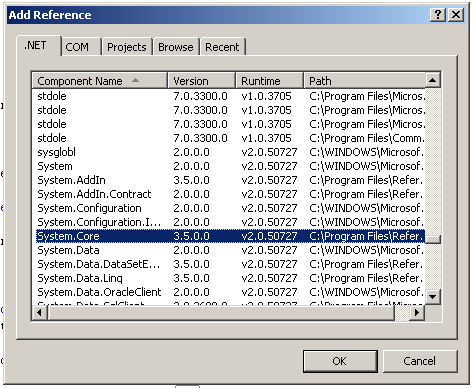
                        You probably need to add a reference (System.Core) to fix this issue. Below the steps for add System.Core references in to your project.

                                             
Add System.Core reference in ASP.NET
  •     Right click on the Bin (or) /Library/References folder in the Solution Explorer
  •     Choose Add Reference
  •     Click the .NET tab and scroll down to System.Core
  •      Click OK to add the new reference
Please share this post if it's useful to you. Thanks!.


ASP.NET: Unable to make the session state request to the session state server.

Saturday

Unable to make the session state request to the session state server

Problem:

Unable to make the session state request to the session state server. Please ensure that the ASP.NET State service is started and that the client and server ports are the same. If the server is on a remote machine, please ensure that it accepts remote requests by checking the value of HKEY_LOCAL_MACHINE\SYSTEM\CurrentControlSet\Services\aspnet_state\Parameters\AllowRemoteConnection. If the server is on the local machine, and if the before mentioned registry value does not exist or is set to 0, then the state server connection string must use either 'localhost' or '127.0.0.1' as the server name.


Description: An unhandled exception occurred during the execution of the current web request. Please review the stack trace for more information about the error and where it originated in the code.

Exception Details: System.Web.HttpException: Unable to make the session state request to the session state server. Please ensure that the ASP.NET State service is started and that the client and server ports are the same. If the server is on a remote machine, please ensure that it accepts remote requests by checking the value of HKEY_LOCAL_MACHINE\SYSTEM\CurrentControlSet\Services\aspnet_state\Parameters\AllowRemoteConnection. If the server is on the local machine, and if the before mentioned registry value does not exist or is set to 0, then the state server connection string must use either 'localhost' or '127.0.0.1' as the server name.

Source Error:


An unhandled exception was generated during the execution of the current web request. Information regarding the origin and location of the exception can be identified using the exception stack trace below.

Stack Trace:


[HttpException (0x80072749): Unable to make the session state request to the
session state server. Please ensure that the ASP.NET State service is started and that the 
client and server ports are the same.  If the server is on a remote machine, please ensure
that it accepts remote requests by checking the value of
HKEY_LOCAL_MACHINE\SYSTEM\CurrentControlSet\Services\aspnet_state\Parameters\AllowRemoteConnection.
If the server is on the local machine, and if the before mentioned registry value does not 
exist or is set to 0, then the state server connection string must use either 'localhost' or '127.0.0.1'
as the server name.]    System.Web.SessionState.OutOfProcSessionStateStore.MakeRequest(StateProtocolVerb 
verb, String id, StateProtocolExclusive exclusiveAccess, Int32 extraFlags, Int32 timeout,
Int32 lockCookie, Byte[] buf, Int32 cb, Int32 networkTimeout, SessionNDMakeRequestResults& results) +1582 
System.Web.SessionState.OutOfProcSessionStateStore.DoGet(HttpContext context, String id, 
StateProtocolExclusive exclusiveAccess, Boolean& locked, TimeSpan& lockAge, Object& lockId,
SessionStateActions& actionFlags) +171    System.Web.SessionState.OutOfProcSessionStateStore.
GetItemExclusive(HttpContext context, String id, Boolean& locked, TimeSpan& lockAge, Object& lockId,
SessionStateActions& actionFlags) +26    System.Web.SessionState.SessionStateModule.GetSessionStateItem() +72
System.Web.SessionState.SessionStateModule.BeginAcquireState(Object source, EventArgs e, AsyncCallback cb, Object extraData) +472 
System.Web.AsyncEventExecutionStep.System.Web.HttpApplication.IExecutionStep.Execute() +90 ]
System.Web.HttpApplication.ExecuteStep(IExecutionStep step, Boolean& completedSynchronously) +161 


Version Information: Microsoft .NET Framework Version:2.0.50727.1433; ASP.NET Version:2.0.50727.1433


Solution:


One I suffered this problem I got the following solution from some other site. Follow the bellow steps:
1) Start–> Administrative Tools –> Services
2) Write click over the service shown below and click "start"

I hope this help you to solve the problem.


RECENT POSTS

Boost

 
Blogger Widgets