Coding Cluster - using asp.net, c#, mvc 4, iphone, php, ios, javascript, in asp.net mvc 3 & more
 

Javascript Email Validation

Thursday

Simple email validation in javascript:
                                             This is a script for validate  form box to ensure that the user entered a valid email address. If not, the form submition is canceled, and the user prompted to re-enter a valid email address.

 This script validate the following assumptions:
  • The mailID should contains a least one character procedding the "@"
  • The mailID should contains a "@" following the procedding character(s)
  • The mailID should contains at least one character following the "@", followed by a dot (.), followed by either a two character or three character string .

Javascript code for validate email address:
<html>
<head>
    <title>Email Validation</title>
    <script type="text/javascript">
var error;
function isValidEmail(){
var str=document.mailValidation.txtEmail.value
var filter=/^([\w-]+(?:\.[\w-]+)*)@((?:[\w-]+\.)*\w[\w-]{0,66})\.([a-z]{2,6}(?:\.[a-z]{2})?)$/i
if (filter.test(str)){
alert(str +" is  a valid email address");
error=false;
}
else{
alert("Please enter a valid email address!");
error=false;
}

return (error)
}
    </script>

</head>
<body>
    <form name="mailValidation">
    Enter Your Email Address:<br />
    <input type="text" size="15" name="txtEmail">
    <input type="submit" value="Submit" onclick="return isValidEmail();">
    </form>
</body>
</html>

Demo:
 
    Enter Your Email Address:  


How to validate email address in iPhone

Monday

iPhone SDK validate email address:
                                        This is prefect method to validate email address valid or not. In this method I'm using "NSPredicate" and "Name Regex" to validate email-ID

Code for email validation on textField in iPhone sdk:
NSString *email = textFieldemail.text;
NSString *emailRegEx =
@"(?:[a-z0-9!#$%\\&'*+/=?\\^_`{|}~-]+(?:\\.[a-z0-9!#$%\\&'*+/=?\\^_`{|}"
@"~-]+)*|\"(?:[\\x01-\\x08\\x0b\\x0c\\x0e-\\x1f\\x21\\x23-\\x5b\\x5d-\\"
@"x7f]|\\\\[\\x01-\\x09\\x0b\\x0c\\x0e-\\x7f])*\")@(?:(?:[a-z0-9](?:[a-"
@"z0-9-]*[a-z0-9])?\\.)+[a-z0-9](?:[a-z0-9-]*[a-z0-9])?|\\[(?:(?:25[0-5"
@"]|2[0-4][0-9]|[01]?[0-9][0-9]?)\\.){3}(?:25[0-5]|2[0-4][0-9]|[01]?[0-"
@"9][0-9]?|[a-z0-9-]*[a-z0-9]:(?:[\\x01-\\x08\\x0b\\x0c\\x0e-\\x1f\\x21"
@"-\\x5a\\x53-\\x7f]|\\\\[\\x01-\\x09\\x0b\\x0c\\x0e-\\x7f])+)\\])";

NSPredicate *regExPredicate =
[NSPredicate predicateWithFormat:@"SELF MATCHES %@", emailRegEx];
BOOL myStringMatchesRegEx = [regExPredicate evaluateWithObject:email];


if(!myStringMatchesRegEx)
{
UIAlertView *alert = [[UIAlertView alloc]initWithTitle:@"email" message:@"invalid email-ID, please provide a valid email id." delegate:nil cancelButtonTitle:@"OK" otherButtonTitles:nil];
[alert show];
[alert release];
}
else
[self prepareHmlDataAndSendEmail];
                        
                     This is another one of  a simplest method to validate an email id on a text box in iphone development.

if (! (([txtMailId.text rangeOfString:@"@"].location != NSNotFound) && ([txtMailId.text rangeOfString:@"."].location != NSNotFound) && [txtMailId.text rangeOfString:@"@"].location < [txtMailId.text rangeOfString:@"."].location ) )
{
UIAlertView *alert = [[UIAlertView alloc]initWithTitle:@"email" message:@"invalid email-ID, please enter a valid email id." delegate:nil cancelButtonTitle:@"OK" otherButtonTitles:nil];
[alert show];
[alert release];
}
else
[self prepareHmlDataAndSendEmail];

How to send an Email using c#

Saturday

Send Email from your GMAIL account using ASP.Net and C#:
                                                    This article is provide a demo for send Emails  from your GMAIL account using ASP.Net and C#:
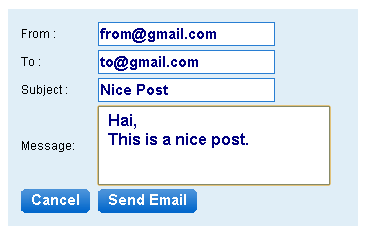
First create an aspx file named "SendGmail.aspx" with required input controls and action buttons. Please refer the below screen shot.


Give the id for from textbox as "txtFrom" and "txtTo", "txtSubject", "txtMessage"  respectively.
Then add the following code into the "Send Email" button's OnClick method in thecode behind. Before appropriate name space (if you need).

Code:
protected void btnSendEmail_Click(object sender, EventArgs e)
    {
        
//Create Mail Message Object with content that you want to send with mail.
        
System.Net.Mail.MailMessage mailMessage = new System.Net.Mail.MailMessage(txtFromMail.Text, txtToMail.Text, txtSubject.Text, txtMessage.Text);
        
mailMessage.IsBodyHtml = false;
        
//Proper Authentication Details need to be passed when sending email from gmail
        
System.Net.NetworkCredential mailAuthentication = new
        
System.Net.NetworkCredential("YourGmailID", "YourGmailPassword");
        
//Smtp Mail server of Gmail is "smpt.gmail.com" and it uses port no. 587
        //For different server like yahoo this details changes and you can
        //get it from respective server.
        
System.Net.Mail.SmtpClient mailClient = new System.Net.Mail.SmtpClient("smtp.gmail.com", 587);
        
//Enable SSL
        
mailClient.EnableSsl = true;
        
mailClient.UseDefaultCredentials = false;
        
mailClient.Credentials = mailAuthentication;
        
mailClient.Send(mailMessage);
    
}
You can download full code for send email using csharp from here

Please leave some comment, if this post useful to you.


RECENT POSTS

Boost

 
Blogger Widgets