Coding Cluster - using asp.net, c#, mvc 4, iphone, php, ios, javascript, in asp.net mvc 3 & more
 

Login failed for user ‘sa’. The user is not associated with a trusted SQL Server connection.(Microsoft SQL Server error: 18456):

Tuesday

Login failed for user 'sa' sql server 2005 :(Microsoft SQL Server error: 18456)
                        Normally if the  SQL Server is not set to use both SQL Server and Windows Authentication Mode, this error will occurred. To fix this issue you have to change the Authentication Mode of the SQL server from “Windows Authentication Mode (Windows Authentication)” to “Mixed Mode (Windows Authentication and SQL Server Authentication)”.
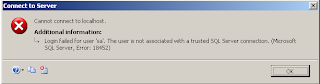
                             

Solution:
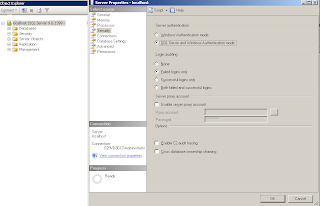
  1.      Go to Start > Programs > Microsoft SQL Server 2005 > SQL Server Management Studio.
  2.      Right-click the Server name. Select Properties > Security.
  3.      Under Server Authentication, select SQL Server and Windows Authentication Mode   (refer the   screenshot below)
  4.     The server must be stopped and re-started before this will take effect.


How to get last inserted Identity value in SQL server - ASP.NET

Thursday

Getting the Identity of the last Inserted row - ASP.net/C#:
                                    The key to @@Identity is that it returns the value of an autoincrement column that is generated on the same connection.
           The Connection object used for the Insert query must be re-used without closing it and opening it up again. Access doesn't support batch statements, so each must be run separately. It is also therefore possible, though not necessary, to create a new Command object to run the Select @@Identity query. The following code shows this in action where the Connection object is opened, then the first query is executed against cmd using ExecuteNonQuery() to perfom the Insert, followed by changing the CommandText property of cmd to "Select @@Identity" and running that.
Code:

protected void btnSave_Click(object sender, EventArgs e)
    {
        string strConnection = ConfigurationManager.ConnectionStrings["myConnectionString"].ConnectionString;
        SqlConnection sqlConn = default(SqlConnection);
        SqlCommand sqlCmd = default(SqlCommand);
        try
        {
            string query2 = "Select @@Identity";
            sqlConn = new SqlConnection(strConnection);
            sqlCmd = new SqlCommand("INSERT into student (firstname, lastname, street, city, state) VALUES ('" + txtFirstname.Text + "', '" + txtLastname.Text + "', '" + txtStreet.Text + "','" + txtCity.Text + "','" + txtState.Text + "')", sqlConn);
            sqlConn.Open();
            sqlCmd.ExecuteNonQuery();
            sqlCmd.CommandText = query2;
            int idx = Convert.ToInt32(sqlCmd.ExecuteScalar());
            if (idx != 0)
            {
                Response.Write("<script>alert('Successfully saved')</script>");
            }
            else
                Response.Write("<script>alert('Not saved')</script>");
        }
        catch (Exception ex)
        {
            Response.Write(ex.ToString() + "<br>");
        }
        finally
        {
            sqlConn.Close();
        }
    }
Please share this post if it's useful to you. Thanks!.

How to Saving/Retrieving Data using- NSUserDefaults :iPhone ( like a session)

Wednesday

Save and retrieve data by using NSUserDefaults - iPhone:
We can save and retrieve different types of data using the NSUserDefaults object.  Saving this way is great for when you want to save small amounts of data such as userName,IDs,Date,Time and program state. You can call NSUserDefaults from anywhere in your app.

Simply it's work like  a session in iphone.

Saving different types of data using the NSUserDefaults in iphone

NSUserDefaults *userDefault = [NSUserDefaults standardUserDefaults];

// saving an NSString value
[userDefault setObject:@"YourTextHere" forKey:@"key_String_Identifier"];

// saving an NSInteger value
[userDefault setInteger:99 forKey:@"Key_Integer_Identifier"];

// saving a Double value
[userDefault setDouble:10.8 forKey:@"Key_double_Identifier"];

// saving a Float value
[userDefault setFloat:1.99 forKey:@"Key_float_Identifier"];

//Don't forget to synchronize the data you set after you're done.
[userDefault synchronize];

Retrieving data using the NSUserDefaults in iphone

NSUserDefaults *userDefault = [NSUserDefaults standardUserDefaults];

// getting an NSString value
NSString *udString = [userDefault stringForKey:@"key_String_Identifier"];
//and you get, udString = YourTextHere;

// getting an NSInteger value
NSInteger udInt = [userDefault integerForKey:@"Key_Integer_Identifier"];
//and you get, udInt  = 99;

// getting an Double value
double udDouble = [userDefault doubleForKey:@"Key_double_Identifier"];
//and you get, udDouble = 10.8;

// getting an Float value
float udFloat = [userDefault floatForKey:@"Key_float_Identifier"];
//and you get, udFloat  = 1.99;


RECENT POSTS

Boost

 
Blogger Widgets